
Your WordPress site’s speed matters. A lot. In today’s digital world, slow sites lose visitors fast. Especially in Australia.
Think about it. If your visitors are in Sydney, Melbourne, or anywhere across our wide continent, every extra second of load time costs you. It costs attention. It costs trust. It costs sales.
Running a small business site? A blog? A WooCommerce store? You don’t have time to babysit servers. Or troubleshoot random errors. Or recover from surprise downtime.
That’s where managed WordPress hosting in Australia becomes your smart upgrade. It gives you speed, stability, and security—without turning hosting into a second job.
This guide shows you exactly how to choose the right option for your situation. You’ll learn:
- What managed WordPress hosting really is (and isn’t)
- The real benefits you’ll feel day-to-day
- Why Australia-specific hosting matters more than you think
- How to compare top providers serving Australian users
- A step-by-step method to pick the right host
- Common mistakes that waste money
By the end, you’ll know how to select the best managed WordPress hosting for your needs. No more confusion. No more marketing tricks.
Ready to make your site faster, safer, and easier to run? Let’s dive in.
What Is Managed WordPress Hosting?
Managed WordPress hosting is simple. It’s hosting designed just for WordPress. The provider handles the technical work for you.
Think of it like this: You get WordPress-optimized servers. Plus ongoing maintenance. Plus performance tools. Plus WordPress-aware support.
That’s the core. The details vary by provider. That’s why you need to know what you’re paying for.
What Managed Hosting Actually Includes
Most good managed WordPress hosts offer these essentials:
- WordPress-optimized server setup (fast PHP, tuned databases)
- Automatic WordPress updates
- Daily backups you can easily restore
- Malware scanning and firewall protection
- Staging environments (test changes safely)
- CDN integration for faster loading
- Performance monitoring tools
- Support teams who actually know WordPress
Some platforms go further with developer tools. Others barely offer anything beyond basic updates.
The key question: What exactly are you paying for?
Managed vs Shared vs VPS vs Dedicated
Let’s clear this up once and for all:
- Shared hosting: Cheapest option. Many sites share one server. Fine for hobby sites. Risky for business growth.
- VPS hosting: More control and dedicated resources. But you often manage the server yourself.
- Dedicated hosting: Full physical server. Powerful but expensive. Overkill for most WordPress sites.
- Managed WordPress hosting: Optimized WordPress performance with outsourced server work. It’s about results.
Managed hosting isn’t automatically “better.” It’s better when the provider’s management is real. And when your time, uptime, and performance matter.
Core Components That Actually Matter
1) Server Setup Built for WordPress
WordPress speed isn’t just “fast CPU.” It’s also:
- Efficient PHP handling (proper versions, good process management)
- Smart database tuning (MySQL configuration matters)
- Opcode caching (so PHP doesn’t recompile endlessly)
- Object caching support (Redis/Memcached can be a game-changer)
- Modern HTTP stack (compression, HTTP/2/3 support)
This is where many generic hosts fail. They sell space and hope you figure out the rest.
2) Security That Works

WordPress is popular. That makes it a target. Good managed hosts add layers like:
- Web application firewalls (WAF)
- Login protection and brute-force blocking
- Malware scanning and file checks
- Isolation between accounts (critical on shared platforms)
- Security patching and proactive rules
Security isn’t a plugin you add later. It’s built into the infrastructure.
3) Performance Tweaks That Make a Difference
A good managed host makes speed easy:
- Server-level caching (faster than plugin-only caching)
- Built-in caching that works with WordPress
- CDN support (especially important across Australia)
- Image optimization options
Some platforms provide their own performance plugins. These reduce the need for endless plugin tinkering. Perfect if you don’t want to spend weekends testing cache settings.
Managed vs Unmanaged: The Real Story
| Factor | Managed WordPress Hosting | Unmanaged VPS / DIY Hosting |
|---|---|---|
| Setup time | Fast | Slow |
| Performance tuning | Usually included | You do it (or pay someone) |
| Security baseline | Stronger by default | Depends on you |
| Backups/restores | Automated, easy | You configure everything |
| Updates | Often handled | You handle or automate |
| Support quality | WordPress-focused | Often server-focused |
| Flexibility | Varies | Full control |
| Cost | Higher | Lower (until you add labor) |
| Best for | Business sites, stores | Devs, sysadmins |
Managed hosting costs more because it replaces time, expertise, and risk. If you’re not comfortable managing servers, unmanaged hosting becomes expensive in hidden ways.
Why Australia Changes Everything
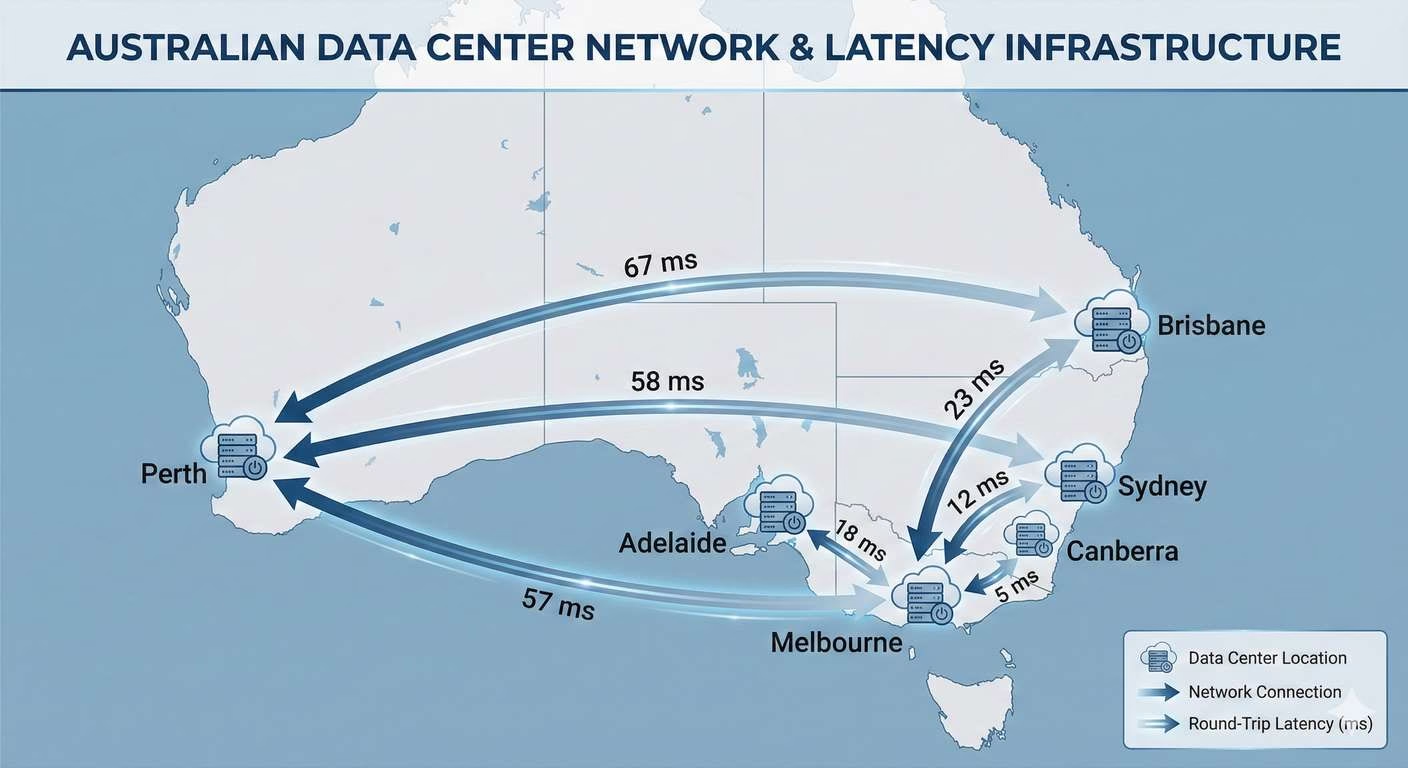
Australia’s geography matters. If your server is far away, your visitors pay the latency penalty. Every single click.
CDNs help, but they don’t fix slow backend response times. If your WooCommerce checkout talks to a distant database, that’s still a delay.
Australian businesses care about:
- Data handling expectations (privacy obligations)
- Local support hours (AEST-friendly support is practical)
- Stable performance for local users
- Better user experience and conversions
That’s why Australian WordPress hosting isn’t just about patriotism—it’s physics and business.
Benefits You’ll Actually Feel
1) Speed That Converts
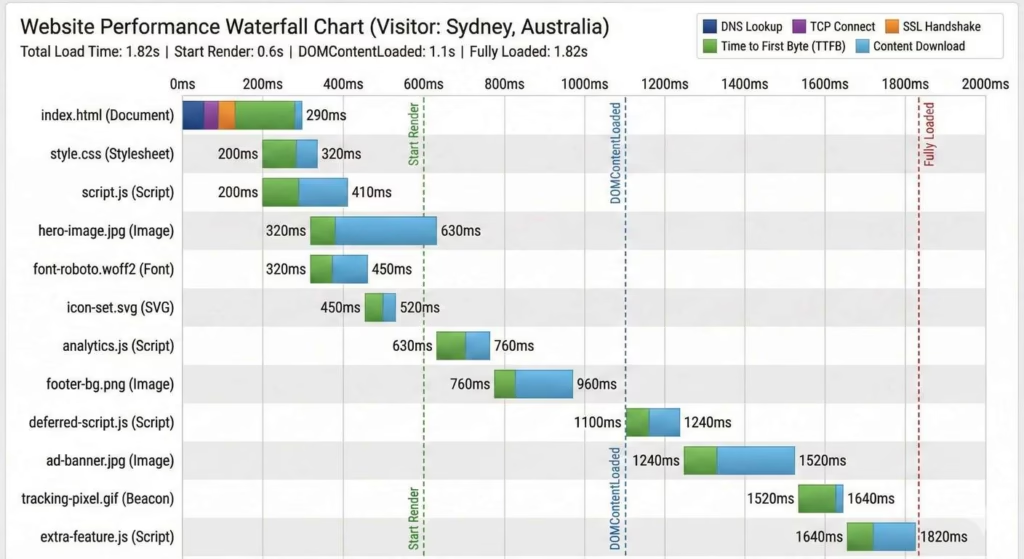
Fast sites win. Not because “Google loves speed” (it does). But because humans bounce when a site feels sluggish.
Research shows abandonment rises sharply after a few seconds. Slow sites literally bleed money and readers.
Managed hosts improve speed through:
- Better server resources and isolation
- WordPress-tuned caching
- Modern PHP stacks
- Built-in or easy CDN integration
- Optimized databases and server configs
If you’ve been on bargain shared hosting, the difference is immediate. Faster admin dashboard. Faster page generation. Fewer random slowdowns.
Pro tip: If your host can’t tell you what caching layers they use, you’re guessing.
2) Security That Works
Most WordPress hacks happen through:
- Outdated plugins/themes
- Weak passwords
- Poor server isolation
- No firewall rules
- Insecure admin access
Managed hosts reduce risk by making security a default condition. The best ones combine:
- Network-level protection (DDoS/WAF)
- Application-level rules (WordPress-specific attack patterns)
- Proactive scanning and mitigation
- Automated backups for fast recovery
No host can guarantee you’ll never get hacked. But a good managed host makes it harder to compromise and easier to recover.
3) Scaling for Traffic Spikes
Australia has seasonal spikes—sales campaigns, product drops, media mentions. Shared hosting often collapses under sudden load.
Managed WordPress hosting handles spikes better through:
- Better resource allocation
- More aggressive caching options
- Easy vertical scaling
- CDN support to offload static assets
Some platforms let you scale with just a few clicks. That matters when traffic is unpredictable.
4) Backups You Can Trust
If you run a business site, backups aren’t optional. They’re insurance.
Good managed hosts provide:
- Automatic daily backups (sometimes more frequent)
- Offsite storage
- One-click restore points
- Easy cloning for testing
Example: You update a plugin and your checkout breaks. On cheap hosting, you’re manually restoring files. On a good managed host, you restore in minutes.
5) Expert Support When Things Break
WordPress issues are rarely “one thing.” They’re often:
- Plugin conflicts
- Cache problems
- Theme performance issues
- Database slow queries
- PHP compatibility issues
Basic hosts give generic help. A solid managed host gives WordPress-literate support that solves real problems.
Look for: support that can identify performance bottlenecks, not just send links to documentation.
6) Staging Environments (Stop Breaking Your Site)
Staging lets you test changes safely:
- Theme edits
- Plugin updates
- New features
- Performance tweaks
Without staging, you’ll eventually break your live site during an update. It’s not “if.” It’s “when.”
7) Time Savings (The Hidden Benefit)
Managed hosting trades money for time and risk reduction. You stop doing:
- Server troubleshooting
- Manual updates
- Security patch chasing
- Backup babysitting
- Performance tuning guesswork
That time goes back into content, marketing, or client work.
Benefits for Businesses (ROI, Not Tech Points)
For businesses, managed hosting impacts:
- Conversion rates: faster sites generally convert better
- Lead generation: less friction, better trust
- Reputation: fewer “site is down” moments
- Operational costs: less emergency developer time
- Compliance confidence: better processes
Even “99.9% uptime” claims aren’t the point. The point is how often your site fails during critical moments.
Why Choose Managed WordPress Hosting in Australia?
If your audience is primarily Australian, hosting location affects your site more than you think.
1) Lower Latency for Aussie Visitors
Latency is the delay between a visitor’s request and your server’s response. If your server is overseas, you’re adding distance.
A CDN helps with static files. But many WordPress pages are dynamic—especially:
- WooCommerce carts and checkout
- Membership dashboards
- Logged-in experiences
- Search and filtering
- Personalized content
For these, local or nearby infrastructure helps.
2) Data Privacy and Trust
Australian users care where data is stored. Depending on your business, you may have expectations around:
- Customer data handling
- Third-party processors
- Breach preparedness
- Local legal requirements
You don’t need to be paranoid—you need to be intentional.
3) Support That Works in Your Time Zone
If your site goes down at 10am AEST, waiting for a support team that wakes up hours later isn’t acceptable. Local-time support matters—especially for e-commerce.
4) Better Fit for Australian Infrastructure
Australia’s connectivity is strong in cities, but geography still matters. If you serve regional users, you want:
- Good network routing
- CDN edge coverage
- Stable server response times
5) Local SEO and User Experience
Local hosting isn’t a magic SEO button. But it supports better user experience through faster response times for local visitors.
Global vs Local: When Overseas Hosting Makes Sense
If your audience is global, or mostly outside Australia, you might choose a region closer to your users. But for most Australian small businesses, the rule is simple: host close to your primary audience.
A modern approach uses a managed platform that lets you pick data center locations (including Australian regions) with CDN acceleration. This gives local performance without losing flexibility.
Top Managed WordPress Hosting Providers in Australia
There isn’t one “best” host for everyone. The right pick depends on:
- Your traffic and site type (blog vs business vs WooCommerce)
- Your technical comfort level
- Your need for flexibility vs simplicity
- Your budget
Let’s look at providers commonly used by Australian site owners.
Cloudways (Flexible Managed Platform)
Cloudways is a managed platform on top of major cloud providers. Instead of locking you into one host’s hardware, you choose your cloud provider and location.
It’s perfect if you want more control than “fully locked-down managed WordPress,” without going fully DIY.
Key features include:
- Easy site migrations
- Staging environments
- Automated backups
- Performance-focused tooling
- Straightforward scaling
For Australian sites, deploying closer to local visitors—combined with CDN—creates a strong setup.
Learn more about Cloudways in this detailed review
WP Engine (Premium Managed WordPress)
WP Engine is a premium managed WordPress provider. It emphasizes stability, security, and a hands-off experience.
It’s ideal if you want a provider that makes many choices for you. Great for teams that value consistency over flexibility.
You’ll typically get:
- Staging environments
- Backups
- Strong WordPress-specific support
The downside? Premium pricing and some restrictions if you want full server freedom.
Kinsta (Premium Managed WordPress)
Kinsta is another premium option known for strong performance and a streamlined dashboard.
It appeals to businesses wanting excellent speed and reliable workflows. Support is WordPress-focused.
Like other premium providers, cost can be high for smaller sites. But for business-critical sites, it’s often worth it.
SiteGround (Entry-to-Mid Option)
SiteGround is a step up from bargain shared hosting. It offers decent performance tools and user-friendly management.
It’s practical if you want better performance without premium pricing.
The trade-off? Scaling and advanced controls may not match higher-end platforms. Great for bloggers and small sites wanting simplicity.
VentraIP (Australia-Focused Hosting)
VentraIP is Australia-centric. It appeals to users wanting local support and infrastructure.
Local providers work well when you value AU-based operations and faster local response times.
Check what “managed” means on your specific plan:
- Backup frequency
- Staging availability
- Performance tooling
- Support scope
If local-first is your priority, it’s worth considering.
Digital Pacific (Business-Oriented Australian Hosting)
Digital Pacific suits Australian businesses wanting robust infrastructure and local presence.
If you want a provider speaking the language of uptime and business operations, this fits well.
Examine plan specifics:
- Staging availability
- Backup system quality
- Security tooling
- Support responsiveness
For Australian businesses preferring local vendors, this is a natural option.
How to Choose the Right Provider
Follow this checklist to save money and regret.
Step 1: Assess Your Actual Needs
Ask yourself:
- Is this a simple site, content blog, or WooCommerce store?
- How much traffic do you get now—and what spikes do you expect?
- Do you need staging?
- Do you need email hosting too?
- How technical are you (or your team)?
If you run WooCommerce, you need stronger hosting than a blog. Period.
Step 2: Create a Feature Checklist
For most Australian business sites, must-haves are:
- Daily backups minimum (more frequent for stores)
- Easy one-click restores
- Staging environment
- SSL included and easy
- Real caching layer
- CDN integration option
- Malware scanning or WAF protections
- Support during your working hours
If scaling or running multiple sites, add:
- Team access controls
- Migration support
- Performance monitoring
- Easy scaling options
Step 3: Evaluate Performance Properly
Don’t get hypnotized by “unlimited.” It’s marketing.
Instead:
- Look for server-level caching and object caching
- Check if CDN is included or easy to add
- Confirm modern PHP version support
- Ask about resource isolation
- See if they provide performance insights
Compare Cloudways to shared hosting to understand the performance difference
Step 4: Audit Support Quality
Ask:
- Is support 24/7?
- Do they specialize in WordPress?
- Will they help with performance issues?
- Do they help with hacked sites and recovery?
A good host tells you what they support. A bad host promises everything until you pay.
Step 5: Pricing Reality Check
Managed hosting hides costs in:
- Add-on backups
- Paid migrations
- Extra staging environments
- CDN charges
- “Overage” fees
- Higher-tier support gating
A mid-tier managed platform with pay-as-you-go scaling can be more cost-efficient than premium plans.
Step 6: Read Reviews Smartly
Ignore extremes. Look for patterns:
- “Support is great” repeated consistently matters.
- “Frequent downtime” repeated consistently matters.
- “Backups failed” is a red alert.
- “Billing surprises” is a red alert.
Focus on reviews from people with sites like yours.
Step 7: Test Before Committing
If there’s a trial option:
- Migrate a staging copy first
- Test speed from Australian locations
- Test support response quality
See how Cloudways compares to other hosting solutions
Common Mistakes Australians Make
- Choosing based on price alone
Cheap hosting is expensive when it slows growth or breaks during spikes. - Assuming “managed” means the same everywhere
It doesn’t. Compare backup systems, caching, and support. - Ignoring server location and latency
If your customers are Australian, distance matters. - Overloading WordPress with plugins
If your host has strong caching, you often need fewer plugins. - No staging environment
You will break your site eventually. Staging prevents that. - No restore testing
Untested backups are just comforting stories.
Practical Setup Tips
Managed hosting gives you a stronger base, but your setup still matters.
Optimize Your Theme and Plugins
- Avoid heavy page builders if unnecessary
- Remove unused plugins
- Replace slow plugins with lighter alternatives
- Keep everything updated
Use a CDN Strategically
A CDN helps Australia by:
- Speeding up static assets across states
- Helping with international traffic
Many managed hosts make CDN easy. Some integrate it directly.
Learn how to speed up your WordPress website
Configure Caching Correctly
Don’t stack multiple caching plugins that fight each other.
Rule of thumb:
- One caching strategy
- One page cache layer
- Optional object cache if supported
- CDN for static assets
Backups: Keep Multiple Recovery Options
Even with managed backups:
- Export key site data periodically
- Keep copies of critical assets
- Document restore steps
You don’t want to learn restoration during a crisis.
FAQs: Managed WordPress Hosting in Australia
Is managed hosting worth it in Australia?
If your site supports a business, earns income, or represents your brand seriously—yes. Managed hosting reduces downtime risk, improves performance, and saves you time.
If you run a hobby blog with low traffic, the value depends on how much you hate technical maintenance.
Do I need an Australian data center, or is a CDN enough?
A CDN helps, but it’s not a complete substitute. If your site has dynamic pages (WooCommerce, membership), your backend response time still matters.
The best setup for many Australian sites is local hosting plus CDN.
What’s the difference between “managed WordPress” and “managed cloud platforms”?
Traditional managed WordPress gives you a curated environment with standardization. Managed cloud platforms offer more flexibility while handling management tasks.
If you want control without full sysadmin work, a managed cloud approach works well.
Learn what Cloudways really is
Will managed hosting fix a slow WordPress site automatically?
It will help—but it won’t fix bad fundamentals. A bloated theme, massive images, and plugin overload can make any site slow.
Think of managed hosting as a strong foundation. You still need to build a sensible house.
What should I prioritize for WooCommerce in Australia?
Prioritize:
- Strong server resources
- Reliable caching that won’t break carts
- Fast database performance
- Frequent backups
- Excellent support
WooCommerce is more demanding than a blog. Ensure your host handles traffic spikes well.
Conclusion: Choose Based on Results
Managed WordPress hosting isn’t about fancy dashboards. It’s about results: speed, security, uptime, and fewer headaches.
If your audience is in Australia, local performance and practical support timing matter more than you think.
The best approach is simple:
- Know your site’s needs
- Demand real backups, staging, and performance tools
- Choose server location strategically
- Evaluate support quality
- Test before committing
You’ll find strong options across premium providers, Australia-focused hosts, and flexible platforms.
Options like Cloudways stand out for sites wanting a balance of advanced tools, scaling flexibility, and Australian-friendly infrastructure—without full DIY management.
Explore Cloudways migration options here
Discover comprehensive cloud hosting solutions
Check out Liquid Web server options
Learn about the best cloud storage services
Pick the host that makes your site faster, safer, and easier to run—not the one with the cheapest monthly bill and most future regret. Your business deserves better.
