

Introduction
Slow checkouts cost you sales. This is true during big sales. Every second counts. This guide explains managed hosting. It helps your store run faster. It keeps checkouts safe. It helps you grow without stress.
You will learn why it matters. You will learn how to pick a plan. You will learn how to move your site safely. We will also look at Cloudways. It is a flexible option. It fits teams who want power. They want this without the hard work.

What is Managed Hosting?
What is managed hosting? It is not just space on a server. The provider does the hard work for you. They handle setup. They handle security updates. They handle backups. They watch for problems. They help when things break.
But be careful. The term is used loosely. There are three main types.
1) Fully Managed WordPress Hosting
This model handles almost everything. You get strong defaults. You get fast caching. You get easy staging tools. Updates often happen automatically. But you give up some control. Some plugins may not work. Server access can be limited. You cannot tweak everything.
2) Managed Cloud Hosting
This is a middle ground. You choose the infrastructure. They manage the platform. You get more control than fully managed hosting. But you do not do raw server work. This fits WooCommerce stores well. You can scale resources easily. The platform handles backups and security.
3) Managed Control Panel on a VPS
Some providers call a VPS managed. They provide a control panel. They offer optional support. But you still do much of the work. You handle updates. You handle security. You handle tuning. If your store makes money, be careful. Do not assume someone else is responsible when checkout fails.
Who Does What?
| Area | You Manage (DIY) | Provider Manages (Managed) |
|---|---|---|
| Server Setup | OS, web server, config | Baseline stack + tuning |
| Security | Updates, hardening | OS patching + tools |
| Backups | Build system, test restores | Automated backups + restore |
| Scaling | Planning + execution | Options + support |
| Troubleshooting | You diagnose everything | Support helps fix issues |
The key question: Who is accountable at 2 a.m.? How fast can they act?
Why WooCommerce Needs Managed Hosting
WooCommerce is not just WordPress. It is a transaction engine. It has dynamic pages. It has logged-in customers. It has cart sessions. It has payment gateways. This complexity makes hosting quality visible.
Performance Matters
A content site can cache everything. A WooCommerce store cannot. Product pages may cache. But cart and checkout pages are dynamic. Logged-in users reduce cache power. Payment gateways add external requests. Database load rises quickly with orders.
Cheap shared hosting is risky. You compete with noisy neighbors. When another tenant spikes, your checkout can stall. Managed hosting helps. The stack is tuned for WooCommerce. It handles PHP better. It uses smart caching. It watches for problems before they cause downtime.
Handling Many Users at Once
During a promotion, traffic spikes. The problem is simultaneous traffic. This stresses PHP workers. It stresses the database. It stresses object caching. It stresses session stability.
If your PHP workers are full, customers see hanging pages. They see checkout errors. They see payment failures. This is lost revenue. It damages trust. Managed hosting reduces this risk.
Uptime is Critical
A blog can go down. An ecommerce site cannot. Downtime means immediate loss. Customers cannot check out. Paid ads keep running. Support tickets spike. Brand trust takes a hit.
You can measure your exposure. Calculate hourly revenue during peak times. Add wasted ad spend. Add support labor costs. Managed hosting reduces risk. It adds monitoring. It offers faster support. It provides predictable scaling.
Security is Vital
Ecommerce sites attract attacks. They process accounts and orders. Managed hosting improves your baseline. It uses hardened server defaults. It offers web firewalls. It scans for malware. It manages patches. It makes backups easier to restore.
Important: Hosting alone does not make you PCI compliant. If you collect payment data directly, rules are complex. The safer approach is to use a reputable payment gateway. Do not store sensitive card data.
Support Saves Weekends
WooCommerce issues are rarely simple. They are stack interactions. A plugin update triggers slow queries. A theme change increases requests. A marketing script adds delay. A gateway webhook fails.
Managed hosting support understands this. They shorten diagnosis time. That matters more than a small cost difference.
Growth is Lumpy
Ecommerce growth comes in spikes. Think launches or holiday sales. You need infrastructure that grows. You do not want a full rebuild. Managed hosting makes scaling a procedure. It is not an emergency.
Managed Hosting vs. Alternatives
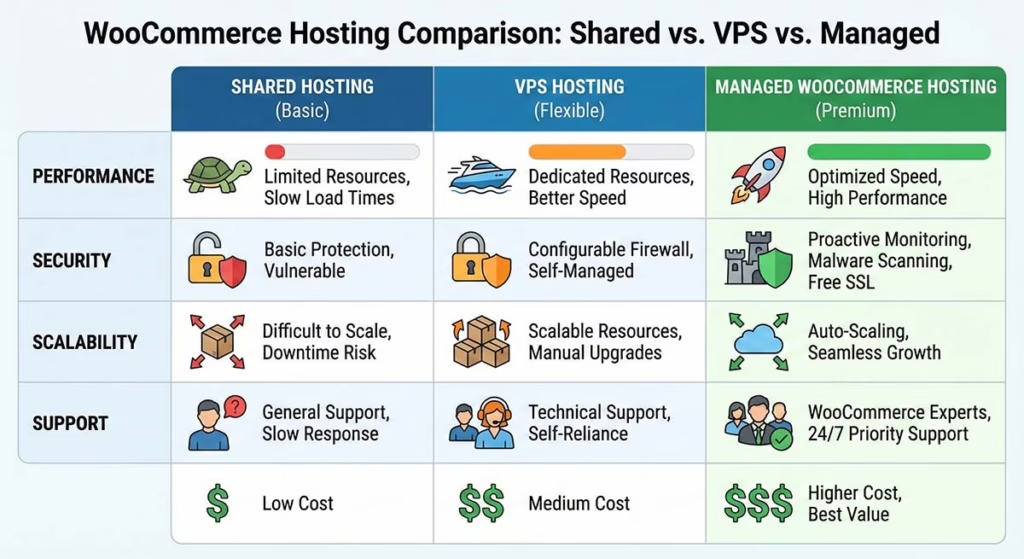
Here is a pragmatic comparison. We will not romanticize any option.
Shared Hosting
Best for: Hobby sites. Early-stage stores with low traffic.
Pros: Cheapest. Simple setup.
Cons: Noisy neighbors. Limited resources. Weak scaling. Generic support. Performance can collapse.
Reality: If your store earns money, shared hosting is a tax. You pay in lost conversions.
VPS (Self-Managed)
Best for: Technical teams. Stores needing custom configs.
Pros: More control. Dedicated resources. Custom stack possible.
Cons: You own patching and security. Performance tuning is on you. Mistakes are expensive. Scaling can be hard.
Reality: VPS can be great. But the cheap part disappears when you price your time.
DIY Cloud (Raw AWS, Google, etc.)
Best for: Teams with DevOps skills.
Pros: Maximum flexibility. Powerful scaling tools.
Cons: Operational complexity. Requires discipline. You pay in engineering time. Surprise bills happen.
Reality: This is a strategic choice. Most small teams do not need it.
Managed WordPress Hosting
Best for: Stores wanting a streamlined environment.
Pros: Optimized defaults. Strong support. Includes staging and backups.
Cons: Less flexibility. Plugin restrictions possible. Scaling options vary.
Reality: Great if constraints align with your stack.
Managed Cloud Hosting
Best for: Stores wanting cloud performance without sysadmin work.
Pros: Flexibility. Easier scaling. Platform features included.
Cons: Not as hands-off as fully managed. Requires some technical judgment.
Reality: This is often the sweet spot. It offers control plus managed operations.
Simple Rules of Thumb
Use these as rough signals.
- If downtime costs money, managed hosting is justified.
- If you run promotions, choose a host with simple scaling.
- If you lack ops skills, avoid DIY infrastructure.
Key Features to Evaluate
Do not shop by GB of RAM alone. Shop by operational capability. Here is what matters most.
1) Infrastructure Choice
Why it matters: Region and latency impact checkout speed.
What to ask: Can I choose the server region? Can I move regions later? Can I choose cloud providers?
How to validate: Check available regions in the control panel. Ask about migration paths.
Note: Cloudways fits here. It runs on multiple cloud options. This offers choice without rebuilding.
2) Scaling Options
Why it matters: Performance problems are often resource saturation.
Definitions: Vertical scaling adds CPU or RAM. Autoscaling adds resources automatically.
What to ask: How quickly can I increase size? Is scaling one-way? Is downtime required?
How to validate: Test scaling in a staging environment. Run a load test before and after.
3) Performance Stack
Why it matters: Speed comes from caching and delivery.
What to look for: Full-page caching for safe pages. Object cache support. CDN compatibility. HTTP/2 support.
How to validate: Measure Time To First Byte (TTFB). Test logged-in vs. logged-out performance. Use consistent testing tools.
4) Database Performance
Why it matters: Stores become database-heavy quickly.
What to ask: Are there DB performance tools? Is the DB isolated? Do they support optimization?
How to validate: Check for slow query diagnostics. Run a report of largest tables.
5) PHP Workers (Critical)
Why it matters: Your store can collapse under concurrent checkouts.
What to ask: How does the host handle concurrency? Are there limits per plan? Can I tune PHP settings?
Simple Math: Estimate workers needed. Take peak users. Multiply by percent doing dynamic requests. Divide by average request time.
How to validate: Run a staging load test. Focus on cart and checkout flows. Monitor error rates.
6) Backups and Restore
Why it matters: Backups are useless if restores are slow.
What to ask: What is the backup frequency? Is restore one-click? Can I restore to staging? Are backups offsite?
How to validate: Do a real restore drill on staging. Time how long it takes.
Note: Cloudways highlights automated backups. This fits the managed platform concept.
7) Security Baseline
Why it matters: Sites are attacked constantly.
What to ask: What is patched automatically? Is a firewall available? Are there bot protection options?
How to validate: Review security documentation. Ask how vulnerabilities are mitigated.
8) Staging and Deployment
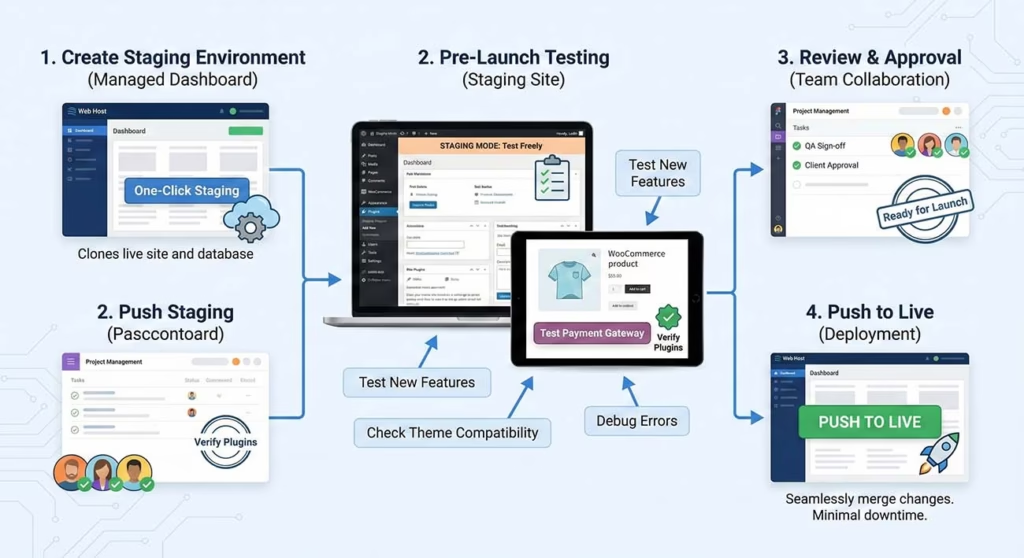
Why it matters: Most outages come from changes.
What to look for: One-click staging. Push or pull workflows. Git integration. Rollback strategy.
How to validate: Create staging. Clone production. Run a test update. Check promotion to production.
9) Support Quality
Why it matters: You need help when a gateway fails at midnight.
What to ask: Is support 24/7? What is the response time? Is WooCommerce included in support?
How to validate: Ask a technical pre-sales question. Judge the answer quality. Open a ticket during a trial.
10) Pricing Transparency
Why it matters: Cheap plans become expensive later.
What to check: How is billing calculated? Are there overage charges? What do backups cost?
How to validate: Run a cost forecast for your peak month. Ask for an example invoice.
How to Test Vendor Claims
Do not rely on homepage promises. Do this instead.
- Clone your store to staging. Use a recent backup snapshot.
- Test speed and stability. Check TTFB. Test add-to-cart. Test checkout completion.
- Run a mini load test. Simulate 20–50 concurrent users. Simulate 5–10 checkouts.
- Observe failure modes. Does it slow gracefully? Or does it error out?
- Test a restore. Restore a backup to staging. Confirm orders appear correctly.
- Test support. Ask about PHP workers and caching.
- Document everything. You are buying predictability. Treat it like an engineering decision.
Real-World Decision Flow: Managed Hosting for WordPress and WooCommerce
Pick the right plan without guessing. Use this simple flow.
Step 1: How critical is downtime?
- If downtime costs money: Managed hosting is the default choice.
- If this is a new store: Start lean. Choose a host with an easy upgrade path.
Step 2: Do you have ops skills?
- No ops skills: Avoid DIY VPS. Pay someone to own it.
- Some ops skills: Managed cloud hosting gives control without full burden.
- Strong ops skills: Self-managed can work. Only do this if you want to maintain it.
Step 3: Do you have traffic spikes?
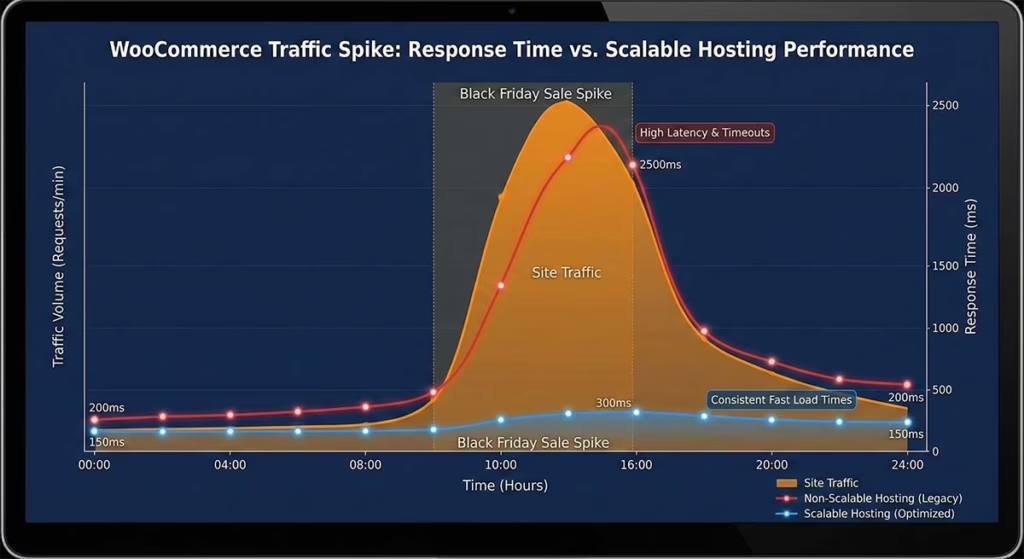
- Yes: Choose a host with fast scaling.
- No: Optimize for consistency and cost. Prioritize backups and support.
Step 4: How complex is your stack?
High complexity means heavy plugins. It means large catalogs. It means many integrations. If you have these, lean toward stronger managed hosting.
Common Starter Configurations
These are typical starting points.
- Small store: Modest CPU and RAM. Add caching and CDN.
- Growing store: Higher CPU and RAM. Add object cache and staging.
- High-volume store: Dedicated resources. Aggressive caching. Strict change control.
If a host cannot explain PHP concurrency, treat that as a red flag.
A Case for Cloudways
Some teams want simplicity. They also want choice. They do not want to be locked in. Others want cloud performance. They do not want to hire a sysadmin.
Cloudways is a managed cloud hosting platform. You get a managed layer. This includes backups and monitoring. You deploy on cloud infrastructure choices. For WooCommerce, this is a practical middle ground. It offers more flexibility than locked-down hosting. It has less overhead than a raw VPS.
Where it tends to fit well:
- Growing stores: Need an upgrade from shared hosting.
- Agencies: Manage multiple sites. Want standardized workflows.
- Teams: Want scalable resources. Do not want to build an ops pipeline.
The right way to evaluate this is not by marketing. Run a trial. Clone your store. Test checkout performance. Test backups. See how support handles WooCommerce questions.
Soft next action: If you consider Cloudways, test a staging migration first. Do this before switching DNS. That one step prevents painful migrations.
Migration and Launch Checklist
A successful migration is mostly planning. Use this workflow.
Pre-Migration Audit
- Inventory your plugins. Find high-I/O plugins.
- Capture current performance. Note TTFB and checkout time.
- Record your environment. Note PHP version and database size.
- List integrations. Note payment gateways and shipping tools.
- Confirm email handling. Check if the host sends email.
Migration Steps
- Spin up a staging server.
- Migrate files and database. Use a tool or do it manually.
- Fix environment differences. Align PHP versions and caching rules.
- Test core flows. Browse products. Add to cart. Checkout.
- Test webhooks. Confirm gateway webhooks reach the site.
- Test performance. Compare speed to the old host.
- Set DNS plan. Lower TTL ahead of time. Choose a quiet cutover window.
- Go live. Switch DNS. Monitor logs.
Rollback Plan
- Keep the old host active for a few days.
- Take fresh backups before cutover.
- If the new environment fails, revert DNS.
First 72 Hours
- Watch for 500 errors.
- Watch for slow queries.
- Watch for checkout abandonment.
- Avoid plugin updates during this window.
FAQ: Managed Hosting
1) Is it worth it for a small store?
It depends on revenue impact. If checkout issues cost money, yes. If you are pre-revenue, start lean. Pick a host with an upgrade path.
2) Is it better than shared hosting?
For most stores, yes. Shared hosting often fails under concurrency. Managed hosting handles traffic spikes better.
3) Can I host multiple sites on one server?
Often yes. Check resource isolation. Ensure clean staging workflows per site.
4) Will it handle PCI compliance?
Hosting provides infrastructure controls. But PCI includes merchant responsibilities. Most stores reduce scope by using hosted payment gateways.
5) How long does migration take?
Small stores take hours. Complex stores take days. Most time is for testing, not file transfer.
6) Can I use Cloudflare?
In most cases, yes. A CDN improves global performance. But exclude cart and checkout pages from cache.
7) What is autoscaling?
Vertical scaling adds resources to one server. Autoscaling adds capacity dynamically. Many WooCommerce setups use vertical scaling plus caching.
8) What are the biggest mistakes?
- Buying based on unlimited claims.
- Not testing restores.
- Making changes in production.
- Ignoring database growth.
9) What should I prioritize?
Checkout reliability. This means adequate PHP concurrency. It means healthy database performance. It means rapid support.
Conclusion
Managed hosting is not about paying for a logo. It is about buying predictable performance. It is about faster recovery. It is about scaling without panic. The best choice depends on your risk and skills.
If you want a low-risk next step, run a staging migration. Test checkout performance before committing. If Cloudways is on your list, treat it like any provider. Verify with a trial. Measure performance under load. Test restores. That process turns hosting from guesswork into an informed decision.
