
Looking for the best cloud hosting in 2025? Compare the top 10 providers for speed, security, support, and pricing. Discover which host fits your needs—whether you’re running WordPress, ecommerce, or a growing business. Free trials and migration options included.
Table of Contents
Introduction
💡 The cloud hosting market is exploding. By 2026, it’s projected to be worth a staggering $912.77 billion—a 483% increase from 2020.
This massive growth means more businesses than ever are moving from traditional hosting to the cloud. But it also creates a huge problem: choice overload.
With giants like AWS, Azure, and Google Cloud offering countless features and complex pricing, how do you choose?
- 20% of businesses don’t even understand their cloud bills.
- Picking the wrong provider can mean slow sites, poor security, and wasted money.
This guide cuts through the noise. We’ve compared the top 10 providers on performance, price, and ease of use to help you find your perfect cloud host.
Our #1 Pick


What is Cloud Hosting?
Cloud hosting works differently from traditional hosting. Instead of relying on a single server, your website or application is spread across a network of connected servers.
Key Benefit: If one server fails, your site automatically moves to another one. This means better uptime and reliability for your business.
✅ Why Businesses Love It:
- Scalability: Easily add more power during traffic spikes.
- Reliability: Near-perfect uptime guarantees.
- Performance: Faster loading from servers closest to your users.
🔧 Main Types of Cloud Services:
- IaaS (Infrastructure as a Service): You rent the raw computing power (servers, storage).
- PaaS (Platform as a Service): A platform for building and running apps without managing the underlying infrastructure.
- SaaS (Software as a Service): Ready-to-use software accessed through a web browser (e.g., Gmail, Salesforce).
👥 Management Styles:
- Managed: The hosting company handles all tech stuff (updates, security, support). Ideal if you lack a tech team.
- Unmanaged: You have full control but are responsible for everything. Cheaper but requires expertise.
Also Read: Managed vs Unmanaged Hosting: Which Is Right for Your Website?
How We Evaluated These Providers
We didn’t just guess. We put these cloud hosts through a rigorous testing process focused on what actually matters for your business.
🚀 Performance & Speed:
- Page load speed tests from multiple global locations.
- Server response time (TTFB) tracking.
- 30-day uptime monitoring.
- CDN and caching effectiveness.
💰 Pricing & Value:
- Analysis of listed rates and hidden fees.
- Contract flexibility and transparency.
- Overall value for money.
🛎️ Customer Support:
- Live chat response time and quality.
- Support ticket resolution efficiency.
- Ability to handle both simple and complex issues.
🔩 Features & Security:
- Included tools and control panel usability.
- Security measures (SSL, firewalls, DDoS protection).
- Backup solutions and scalability options.
🌐 Ease of Use:
- Onboarding process for beginners.
- Dashboard intuitiveness.
- Migration process simplicity.
Our Promise: No host paid for a better spot. Our rankings are based on real data, fair prices, and user-friendly experiences.
Top 10 Cloud Hosting Providers in 2025
1. Amazon Web Services (AWS)
Overview: AWS leads the cloud market with a 32% global share. It has over 200 services and works in 99 areas across 31 regions. AWS helps businesses grow and stay reliable.
Strengths: AWS is great for large businesses. It offers many ways to customize, keeps things secure, and connects well with other tools. You only pay for what you use. AWS also has many third-party tools.
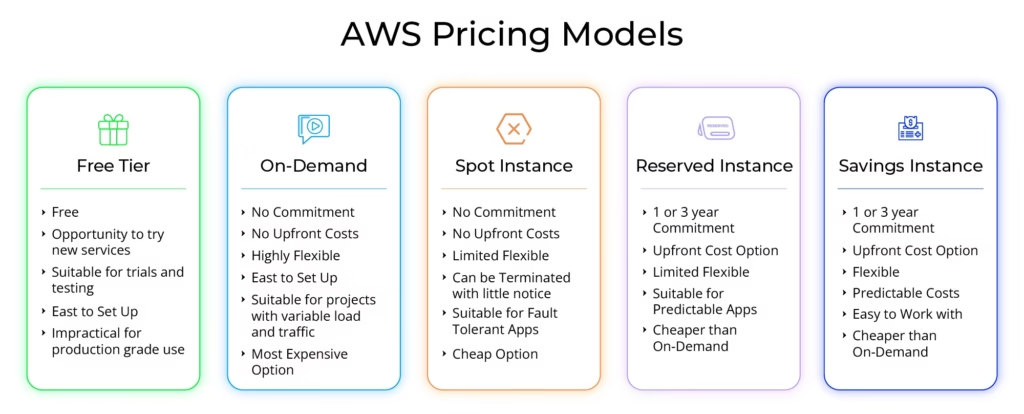
Pricing: AWS uses a pay-as-you-go system. Basic EC2 instances cost $0.0116 per hour ($8.50/month) for t3.nano. Prices can go up with more services. Most companies spend $100-$1,000+ a month.
Best For: Large businesses, developers, global apps, and teams with DevOps.
Pros:
- Wide range of services
- Strong global network
- Great security
- Helpful support
Cons:
- Hard to learn
- Prices can be unclear
- Needs technical skills
- Limited support on basic plans
2. Microsoft Azure
What is it?
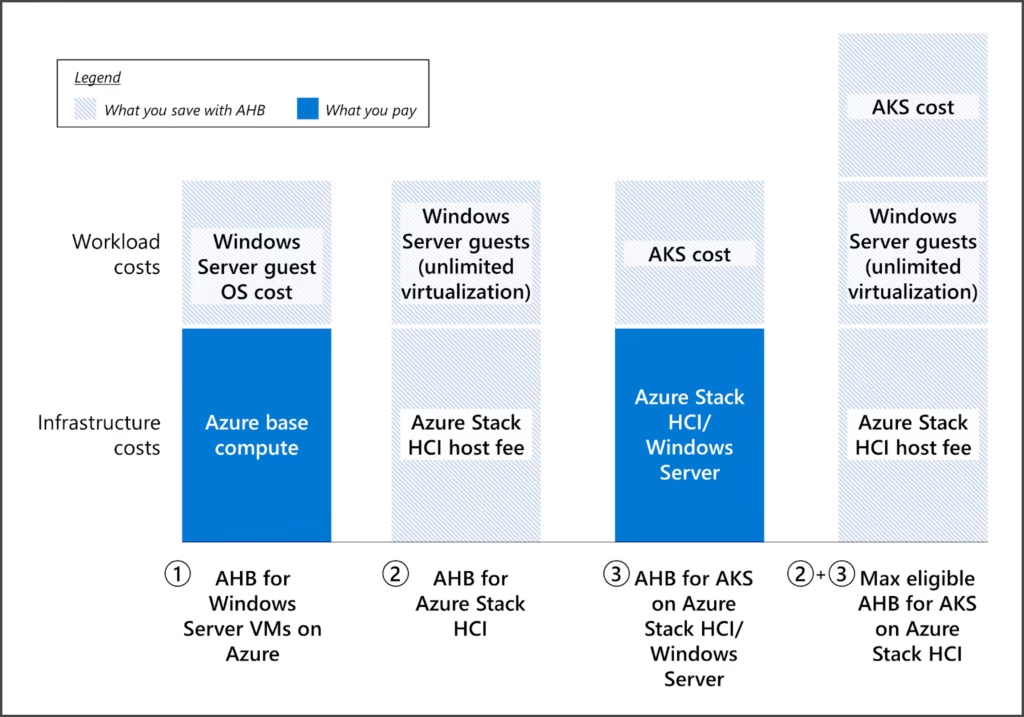
Microsoft Azure has about 23% of the cloud market. It works very well with other Microsoft tools, making it a top pick for companies already using Microsoft.
What is it good at?
It fits perfectly with Windows and Office 365, making moving to the cloud easy for these companies. Azure is the best at mixing on-site and cloud systems. It also has strong support for big businesses and meets many rules.
How much does it cost?
Like AWS, you pay for what you use. Basic computer use starts very cheaply per hour. Big companies can get deals for large use. Costs can get high for heavy users.
Who should use it?
- Big companies with Microsoft tools
- Businesses needing both on-site and cloud
- Anyone who must have Windows work well
- Companies with Microsoft deals
Good points:
- Works perfectly with Microsoft tools
- Best at mixing on-site and cloud
- Great features for big companies
- Available in many places
Things to know:
- Costs can be hard to understand
- You need people who know Microsoft
- Less help for non-Microsoft tools
- It can cost too much for small companies
3. Google Cloud Platform (GCP)

Overview:
Google Cloud Platform has about 11% of the cloud market. It uses Google’s skills in data, intelligent machines, and big network. GCP runs on the same systems that power Google Search, Gmail, and YouTube.
Strengths:
GCP does very well with data studies, smart machines (AI/ML), and learning systems. Its BigQuery tool is top for looking at data. Its big global network makes things work fast. Google cares about being green, which makes GCP good for groups that care about the Earth.
Pricing:
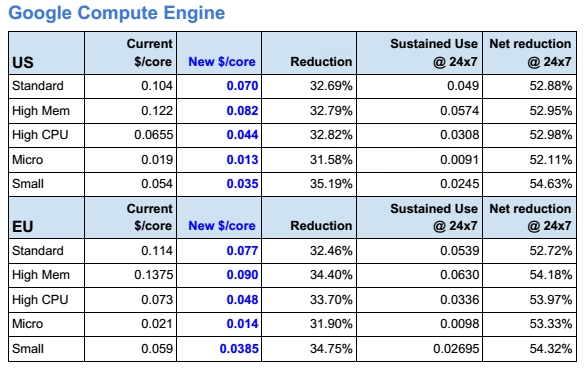
GCP costs are reasonable. Prices are lower automatically when you use it a lot. A small computer starts at $0.0104 per hour ($7.60/month). GCP reveals costs more clearly than AWS or Azure.
Best For:
- Groups that use lots of data
- Groups needing innovative machine tools (AI/ML)
- New small groups wanting reasonable prices
- Groups that care about Earth
Pros:
- Great tools for data and intelligent machines
- Good, clear costs
- Very fast, big network
- Strong care for Earth
Cons:
- Fewer tools than AWS/Azure
- Less help for big groups
- Fewer links to other tools
- Harder to learn if you don’t know Google tools
4. Cloudways (Managed Cloud Hosting)
Cloudways makes cloud hosting easy. It’s the top-managed cloud service. Businesses without IT teams love it. Cloudways runs on big cloud companies. These include AWS, Google Cloud, DigitalOcean, Linode, and Vultr. You get cloud power without the hard work.
Why Cloudways is Strong:
Cloudways cuts out cloud hosting stress. It keeps top speed. They manage everything for you. Enjoy cloud benefits without tech skills. Get auto-scaling, smart caching, and 24/7 expert help. Real cloud experts support you.
How Fast Is It:
In tests, Cloudways loaded sites 3x faster than basic shared hosts. Innovative caching tools (like Varnish, Memcached, and Redis) boost speed. They had 99.99% uptime over 30 days. Servers answered requests in under 200ms worldwide.
Cost:
Prices are clear and start low.
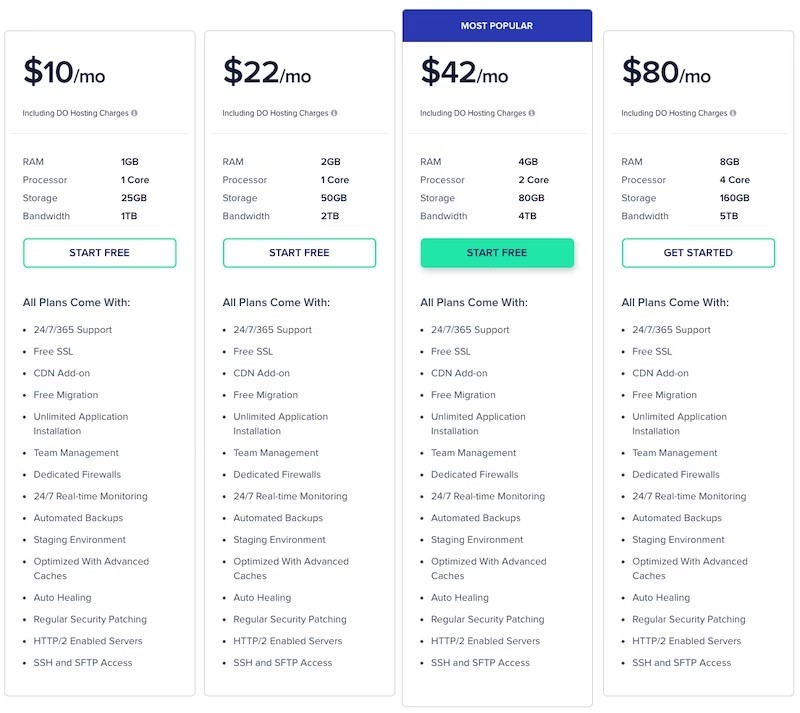
- Starter: $10/month (1GB RAM, 25GB space, 1TB data)
- Standard (most liked): $20/month (2GB RAM, 50GB space, 2TB data)
- No hidden fees. No setup costs. No long contracts.
Moving Your Site:
Cloudways moves your site for free. You can move as many sites as you need. Their experts do it all, saving you hundreds. They move simple sites and big online stores. Your site stays up during the move.
Help When You Need It:
Cloudways offers 24/7 expert help. Their team knows cloud hosting inside out. They help with servers, speed, and safety. Most replies come in under 30 minutes, and most fixes happen in 2-3 hours.
Best For:
- Small or mid-sized firms leaving shared hosting
- Agencies with many client sites
- Online shops need a steady speed
- Anyone wanting cloud power made simple
Good Points:
- Managed cloud with top speed
- Loads 3x faster with smart caching
- Free site moves + 30-day money-back
- Always-on expert help
- Clear prices, no hidden fees
- Grow your site easily
- Choice of cloud companies (AWS, Google Cloud, others)
Less Good Points:
- Uses set server setups
- No Windows hosting
- New users need a little time to learn
- Costs more than basic shared hosting
5. DigitalOcean

DigitalOcean makes cloud hosting simple. They focus on helping developers. Over 600,000 customers use them worldwide. They offer easy cloud computing. It fits between shared hosting and big business clouds.
Strengths:
Simple is key. Their prices are clear. Droplets (virtual machines) start fast. They are easy to use. This helps developers and small companies. Excellent guides and help exist. People help each other. Add apps with one click.
Pricing:
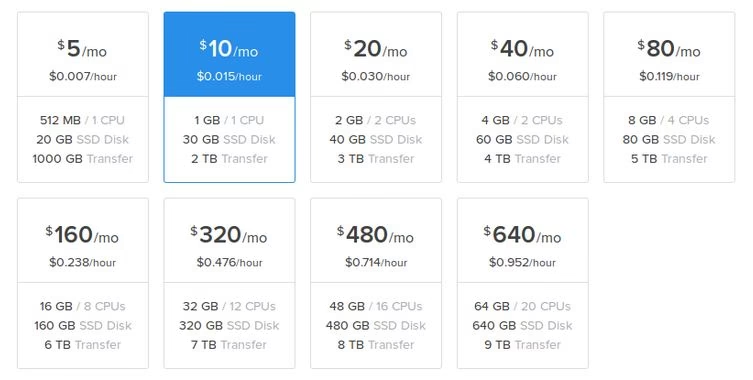
Prices are simple. Basic Droplets cost $5 monthly and give 1GB of memory, 25GB of storage, and 1TB of data. The top plan costs $10 monthly and gives 2GB of memory, 50GB of storage, and 2TB of data. Prices are clear, with no extra costs and no hard math.
Best For:
Developers starting out, small companies wanting easy cloud hosting, agencies needing low-cost answers, and people who like clear prices.
Pros:
- Prices are simple and clear
- Easy for developers to use
- Great guides and help
- Fast storage on every plan
- Works well for the price
Cons:
- A few big business tools
- They don’t run things for you (need tech skills)
- Basic help team
- Fewer places worldwide than big companies
6. Linode (now part of Akamai)

Linode offers fast cloud services. It started in 2003. People like its steady work and fair prices. Good help is a big plus.
Good Points:
- Linode works well with good computers.
- Their help team is excellent. Helpful people are ready anytime.
- They have clear guides and a strong user group.
- Things stay up and run smoothly.
- Prices are fair and open.
Plans & Cost:
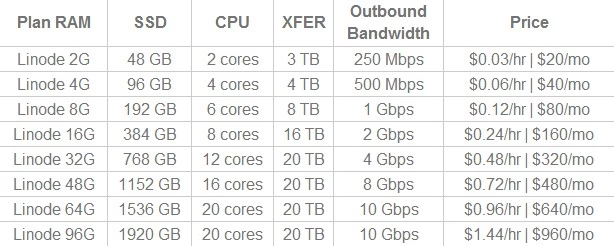
- Basic shared plans start at $5 a month. You get 1GB of memory, 25GB of storage, and 1TB of data transfer.
- Stronger plans cost more for big jobs.
- Prices are easier than AWS or Azure. You get more than basic hosting.
Best For:
- Suitable for businesses that need steady work.
- Suitable for people making apps who need help.
- Good if you want a choice besides the huge companies.
- Good if you like tech know-how.
Not-So-Good Points:
- Fewer computer locations worldwide than big companies.
- Less help setting things up for you.
- Fewer fancy tools than big work systems.
- Fewer extra apps you can add.
7. Vultr

Vultr runs fast computers all over the world. They have more than 25 places for their computers. They focus on speed and low prices.
What Vultr Offers
- Computer space you can rent (like virtual computers).
- Extra storage space.
- Whole computers just for you.
Why Vultr is Good
- Many Locations: They have computers in lots of countries.
- Very Fast: Their computers are great for challenging jobs needing lots of brain power (CPU).
- Easy to Use: Their control screen is simple.
- Lots of Choices: They support many computer systems and apps.
- Low Cost: Their prices are excellent.
Vultr’s Prices
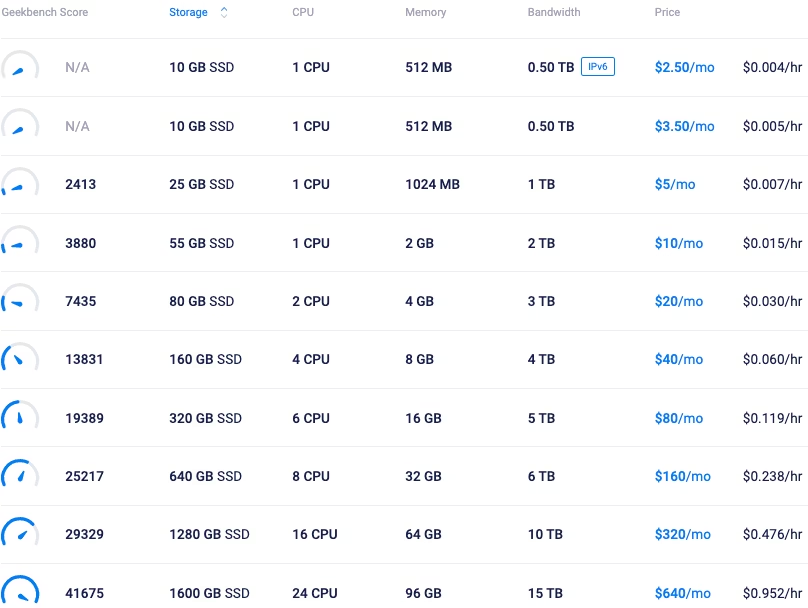
- Basic Plan: It starts at $2.50 each month and includes 512MB memory, 10GB storage, and 0.5TB data transfer.
- Better Plan: It starts at $5 monthly and includes 1GB memory, 25GB storage, and 1TB of data transfer. This is one of the lowest prices around.
Best For You If…
- You want low prices.
- You need computers in different parts of the world.
- Your app needs a speedy brain (CPU).
- You want cheap cloud hosting.
Good Things
- Prices are low.
- Many computer locations worldwide.
- Very fast computer brains (CPU).
- The control screen is easy.
- Many computer systems are available.
Not-So-Good Things
- Little help setting things up for you.
- Basic help if you have problems.
- Fewer tools for big companies.
- Fewer guides and help pages.
8. IBM Cloud

IBM Cloud helps big companies. It uses smart tech and mixed computer systems. It is part of IBM’s other tech tools. It works hard to keep things safe. It follows the rules well. It efficiently works with company systems.
IBM Cloud Strengths:
It is very good at safety and rules, which helps banks and health groups. Its smart tools, like Watson, are top-notch. It works great with mixed computer setups and fits perfectly with other IBM tools.
IBM Cloud Pricing:
Costs can be hard to understand. It mainly serves big firms. Basic computer servers start at $25 each month. Big company setups cost much more. Large deals get special prices.
IBM Cloud Best For:
Big companies. Groups with strict rules. Teams need smart tech help. Businesses are already using IBM tools.
IBM Cloud Pros:
- Keeps things very safe. Follows rules well.
- Has great smart tech tools.
- Works well in mixed setups.
- Fits with IBM’s other tools.
IBM Cloud Cons:
- Prices are hard to figure out.
- Best for big firms, not small.
- Takes time to learn.
- Less useful for small shops.
9. Oracle Cloud
What it is:
Oracle Cloud runs business apps and databases. It handles fast computing jobs, too. Oracle knows databases inside out, and its cloud is built for heavy data work.
Why it’s good:
Oracle Cloud shines with databases and business apps. Its self-run database needs fewer people to work. It stays fast. Computer power is cheap. Lots stay free forever.
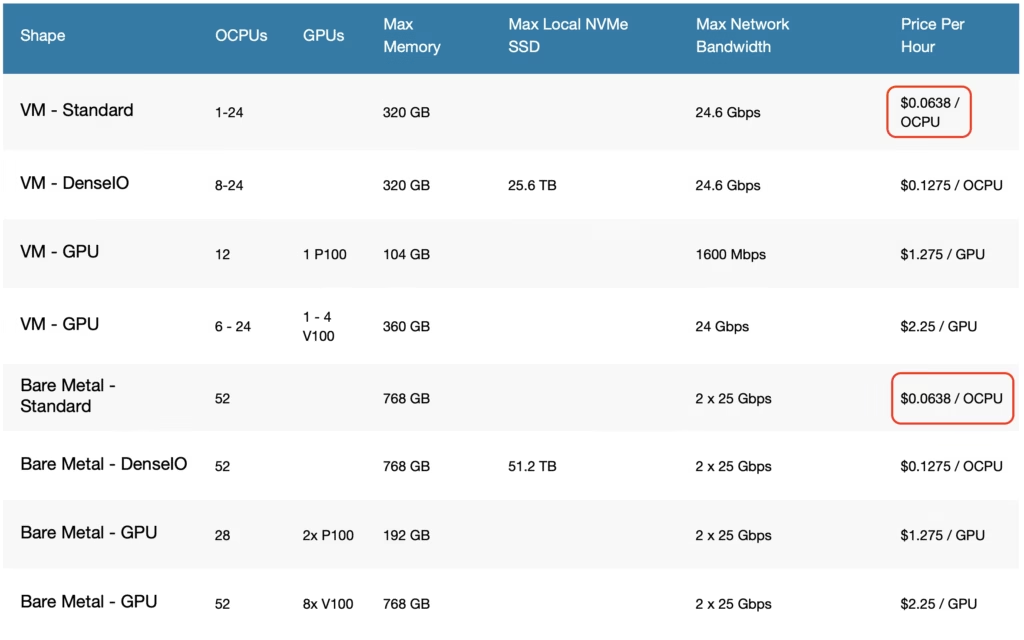
Cost:
Prices start low. Tiny virtual machines cost $0.0085 per hour ($6.20/month). Many things stay free always. Database services also have fair prices.
Best for:
- Firms using Oracle databases
- Work needing super-fast data
- Groups wanting cheap computer power
- Jobs dealing with massive data sets
Good points:
- Top choice for databases and business apps
- Fair prices for computer use
- Plenty of free options
- Handles big data loads well
Not so good points:
- Fewer tools than big names
- Mainly for data and business apps
- Smaller global reach
- Less outside help available
10. Kamatera: Cloud Services Made Simple
Kamatera is a cloud service company that focuses on flexibility. It lets you customize services, offers cloud servers, and offers managed services. It helps businesses of all sizes.
Strengths:
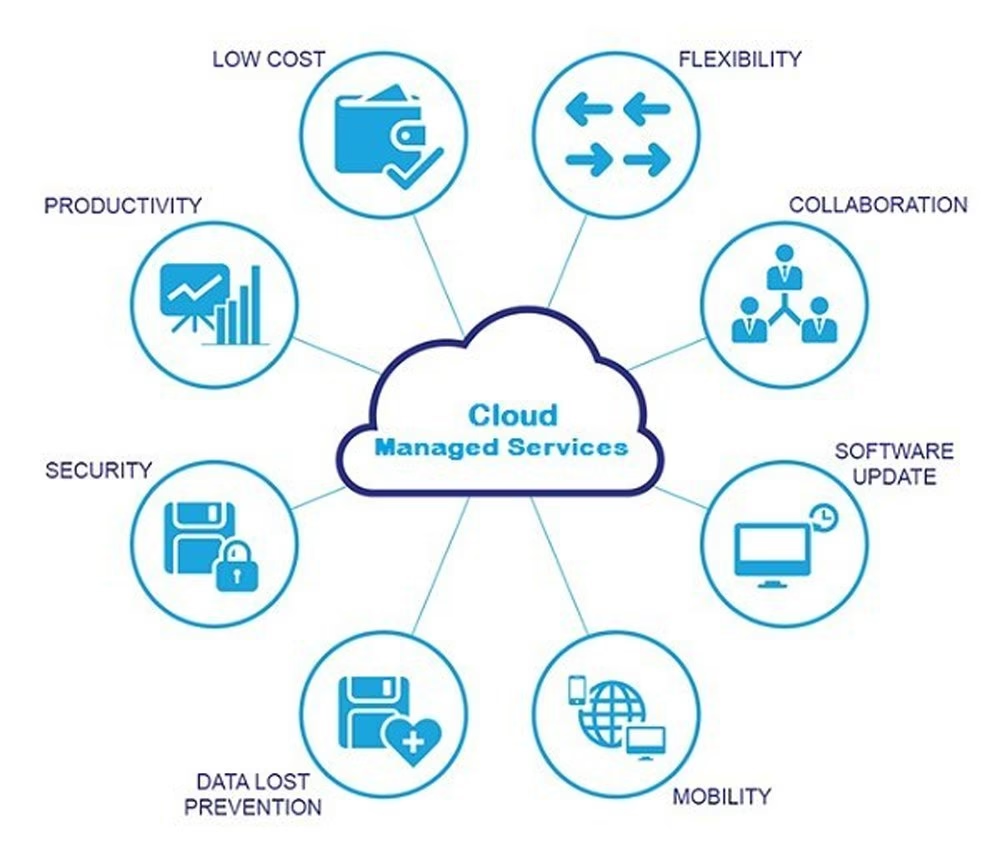
You can change things easily. You only pay for what you use. Their team can take care of the servers for you. This lets you focus on your work. Their systems work well and are reliable. Their prices are reasonable.
Pricing:
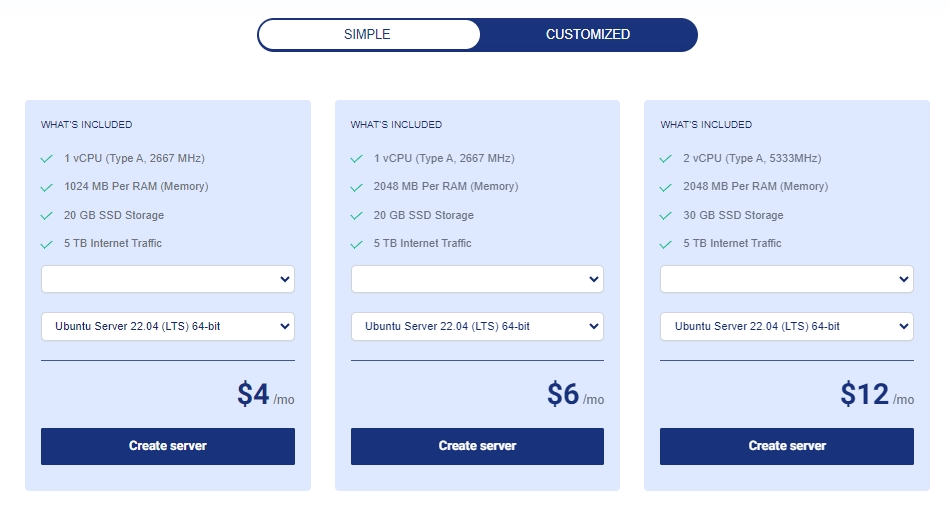
You pay only for what you use. Bare cloud servers start at $4 a month. The price goes up for more power. The price goes up for more memory. The price goes up for more storage. They offer free trials. Billing is flexible.
Best For:
Businesses need special cloud setups. Companies want help managing servers. Groups needing fast, reliable systems.Users who want to adjust resources easily.
Pros:
Easy to change things.
Pay only for what you need.
Good at managing servers.
Reasonable prices for special setups.
Cons:
Smaller size than big companies.
Not as well known.
Fewer fancy features.
Fewer help guides and user support.
Visit KamateraAverage Server Response Time of Top 10 Cloud Hosting Providers

Detailed Comparison Table of Top 10 Cloud Hosting Providers
To help you make an informed decision, here’s a comprehensive side-by-side comparison of the top cloud hosting providers across the most critical factors:
| Provider | Starting Price | Server Type | Migration | Support Type | Uptime SLA | Best For |
|---|---|---|---|---|---|---|
| AWS | $8.50/month | Unmanaged IaaS | Self-service | Paid support plans | 99.99% | Large enterprises |
| Microsoft Azure | $11/month | Unmanaged IaaS | Self-service | Paid support plans | 99.95% | Microsoft ecosystem |
| Google Cloud | $7.60/month | Unmanaged IaaS | Self-service | Community + paid | 99.95% | AI/ML applications |
| Cloudways | $10/month | Managed Cloud | Free unlimited | 24/7 expert support | 99.99% | SMBs & agencies |
| DigitalOcean | $5/month | Unmanaged VPS | Self-service | Ticket-based | 99.99% | Developers |
| Linode | $5/month | Unmanaged VPS | Self-service | 24/7 standard | 99.9% | Performance-focused |
| Vultr | $2.50/month | Unmanaged VPS | Self-service | Ticket-based | 99.9% | Budget-conscious |
| IBM Cloud | $25/month | Enterprise IaaS | Enterprise only | Enterprise support | 99.99% | Large enterprises |
| Oracle Cloud | $6.20/month | Database-focused | Self-service | Paid support | 99.95% | Database-heavy apps |
| Kamatera | $4/month | Customizable VPS | Managed option | Managed services | 99.9% | Custom solutions |

Also Read: Why Cloudways Outperforms the Rest
Key Differentiators:
Cloudways is the only company offering complete managed cloud hosting at this price. Other hosts require you to handle the server, security, and speed yourself. Cloudways does all the technical work for you, but it still provides top-level performance.
Their free moves save you money. Others often charge $200 to $500 for this. Their expert help is available day and night. You talk to real cloud helpers, not just basic support staff.
Cloudways makes it easy to get cloud benefits. They manage everything, have clear prices, and run much faster (they load websites three times quicker), making them the best pick for most businesses.
Unlike AWS or Azure, Cloudways won’t surprise you with huge bills. You pay the same set price each month, and there are no hidden costs or hard math.
Choosing the Right Provider For Your Needs
Use this simple guide to match your business needs with the perfect cloud host.
📊 By Business Size:
- Small Businesses & Startups: Need low cost, easy setup, and room to grow. Cloudways is the best fit here, handling all the technical heavy lifting. Budget options: DigitalOcean or Vultr.
- Medium Businesses: Need steady performance, great support, and scalable resources. Cloudways again excels, offering expert support and clear pricing. Linode is a strong alternative.
- Large Companies: Need top-tier tools, strict security, and formal support. AWS leads here. Azure is best for Microsoft-centric companies.
🛒 By Project Type:
- Online Stores: Need rock-solid speed and uptime. Cloudways provides managed security, optimizations, and stability for traffic spikes.
- Web Apps: Often need custom setups. AWS or Google Cloud offer the most developer freedom.
- Testing & Development: Need low-cost, disposable servers. DigitalOcean or Vultr are perfect for this.
👨💻 By Tech Experience:
- Beginners: Choose managed services like Cloudways. Their support team handles the servers so you can focus on your business.
- Tech Teams & Developers: Can use unmanaged services (DigitalOcean, Linode, AWS) for more control and lower cost.
The Best Fit:
Match the host to your needs now and later. Cloudways works best for most. It offers managed cloud hosting that grows with you, and you won’t need deep tech skills.
Frequently Asked Questions
What’s the difference between cloud hosting and shared hosting?
Answer: Shared hosting crams many sites onto one server, sharing resources. If one site gets busy, yours slows down. Cloud hosting uses a network of servers, providing better speed, reliability, and scalability. You get what you pay for.
How much does cloud hosting cost?
Answer: Basic unmanaged cloud can start as low as $5/month but requires tech skills. Full-service managed cloud hosting (like Cloudways) starts around $10/month, including support and security. Most small businesses pay $10-$40 monthly for excellent service.
Which provider is best for beginners?
Answer: Cloudways is the best choice for beginners. It’s simple but powerful. You get top-tier performance without needing technical skills, as their team handles all server management, security, and optimization.
Do I need tech skills for managed cloud hosting?
Answer: No. That’s the entire point of “managed” hosting. Providers like Cloudways handle all technical work—setup, security, monitoring, and updates. You just manage your website content.
How do I migrate to cloud hosting?
Answer: The difficulty varies. Cloudways offers free migration services handled by their experts. The process involves backing up your site, transferring files, testing, and updating your domain name (DNS). Managed services handle this entire process for you.
Conclusion: Our Verdict
After testing all major options, one provider stands out for delivering enterprise-level performance without the complexity.
🏆 For Most Businesses: Choose Cloudways
It strikes the perfect balance:
- **⚡ Performance:** 3x faster loading than standard hosting.
- **🛡️ Simplicity:** Fully managed servers—no tech skills needed.
- **💵 Value:** Transparent pricing with no surprise bills.
- **🤝 Support:** 24/7 access to real cloud experts.
While AWS/Azure are powerful, they are overkill and overly complex for most websites and small businesses. Cloudways gives you their power with a simple interface.
Ready to experience faster, more reliable hosting?
Launch Your Site on Cloudways Today*Note: This post contains affiliate links, meaning we earn a small commission if you make a purchase through our links, at no extra cost to you. This helps us support the site and continue providing in-depth reviews.

Compare Deeper:
1. Cloudways vs AWS: Which is Best for WordPress?
2. WordPress Cloud Migration Made Easy.
3. Managed vs Unmanaged Cloud Hosting: Best Choice for SMBs.
4. DigitalOcean vs Vultr: Developer-Friendly Cloud Hosting Compared.
5. Cloud Hosting Performance Checklist.
6. Cloud Hosting Costs Explained: What You Really Pay For.
7. Best Cloud Hosting for WordPress.
8. Best Cloud Hosting for Ecommerce Stores.
9. Estimate Your Monthly Cloud Hosting Cost.
10. The Ultimate Website Migration Guide.

Related Keywords:
- cloudways alternative
- wordpress hosting saudi arabia
- best cloud hosting provider
- best cloud hosting provider in india
- private cloud hosting provider
- aws cloud hosting provider
- affordable cloud hosting provider
- google cloud hosting provider
- public cloud hosting provider
- quickbooks cloud hosting provider
- cloud computing services aws
- cloud computing services are based on dash model
- cloud computing services are
- cloud hosting examples
- cloud hosting platforms
- cloud hosting vendor
- best cloud hosting providers for quickbooks
- cloud computing company bangalore
- cloud computing services by amazon
- cloud computing best companies
- cloud vs hosting
- cloud server hosting setup provider in bhubaneswar
- best cloud hosting server provider
- company cloud hosting providers
- cloud hosting europe
- e-commerce hosting services
- enterprise cloud hosting price
- enterprise cloud hosting
- cloud computing for companies
- cloud hosting for quickbooks desktop
- cloud hosting for small business
- cloud computing services geeks for geeks
- cloud computing services google
- cloud hosting google
- cloud provider gcp
- google cloud hosting services
- cloud computing companies in india
- cloud computing services in aws
- cloud hosting solutions iii
- cloud vps hosting provider in us
- managed private cloud hosting india provider
- k hosting
- cloud computing providers list
- cloud computing services list
- cloud computing companies list
- cloud computing leading companies
- cloud computing largest companies
- list of cloud hosting providers
- cloud computing service models
- cloud computing services microsoft azure